Are eSIMs safe? How to use an eSIM securely with ExpressVPN


eSIMs are generally safe to use. Like a physical SIM, an eSIM connects your device to a mobile network, but it's downloaded and installed digitally rather than being inserted physically.
The ExpressVPN holiday.com eSIM provides mobile data while you travel, and using it with ExpressVPN connected encrypts your internet traffic to help protect your privacy.
Is the ExpressVPN holiday.com eSIM safe?
The ExpressVPN holiday.com eSIM connects to local mobile network operators to provide data abroad, helping you avoid the risks associated with unsecured public Wi-Fi. Like a physical SIM card, the holiday.com eSIM uses standard mobile-network authentication to verify that it’s authorized to connect to a mobile network.
During setup, encrypted communication and additional authentication checks help protect the eSIM profile as it’s downloaded and installed, reducing the risk of unauthorized installation. Plus, holiday.com limits how your personal data is used and shared. It requires third-party service providers to protect your information, restricts their access to what's necessary for their work, and prohibits them from using it for other purposes.
Buying the eSIM through ExpressVPN or holiday.com also helps ensure you're purchasing from the official provider. Be cautious of unfamiliar websites offering travel eSIMs, particularly if they ask for unnecessary personal information or account credentials.
What does ExpressVPN add to an eSIM?
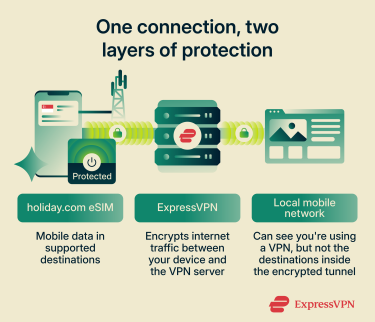
The holiday.com eSIM gives your device a mobile data connection while abroad, and ExpressVPN protects the traffic that travels over it.
When you're roaming, the local mobile network operator may be able to infer which websites and services you connect to. ExpressVPN encrypts your traffic between your device and the VPN server, helping prevent the operator from directly seeing your browsing destinations. The operator can still see that you're using a VPN, though, and they may be able to infer some information from traffic patterns and other metadata.
ExpressVPN offers similar privacy benefits when you connect to public Wi-Fi networks, such as those in hotels and airports. It doesn't make you anonymous or prevent all forms of tracking, but it helps keep your online activity more private while you're on the move.
How to use the ExpressVPN holiday.com eSIM while traveling
Setting up and using the holiday.com eSIM just takes a few simple steps.
Activate and set up the eSIM before traveling
Install the eSIM before you leave, while you have a stable Wi-Fi connection. You'll need an eSIM-compatible, carrier-unlocked phone and the holiday.com app, plus an applicable ExpressVPN subscription. The holiday.com eSIM comes with ExpressVPN's Advanced and Express Pro plans, and can also be purchased separately from the ExpressVPN+ dashboard or from the holiday.com app or website.
Advanced users get a 3-day 3GB eSIM coupon, and Express Pro users receive a 5-day 3GB coupon.
Here’s how to get started:
- Sign into your ExpressVPN+ dashboard and go to holiday.com eSIM > eSIM Store.
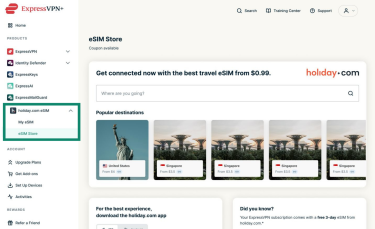
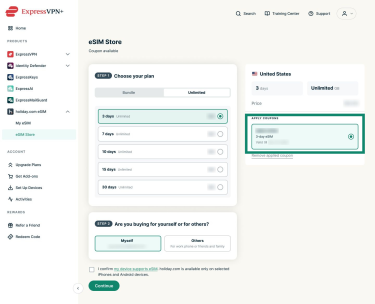
- Choose your destination and an eligible bundle, and apply your coupon.
- Download the holiday.com app and sign in with your ExpressVPN account.
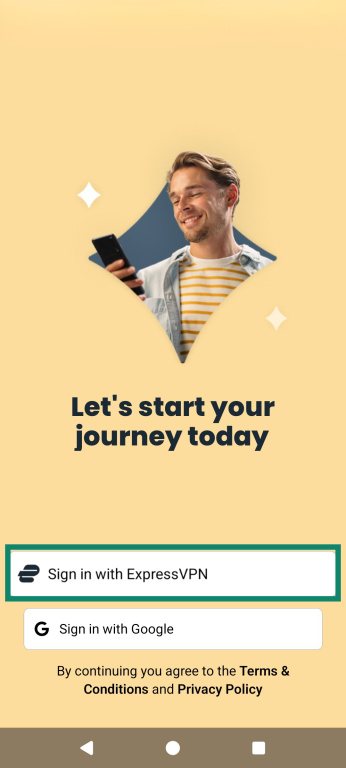
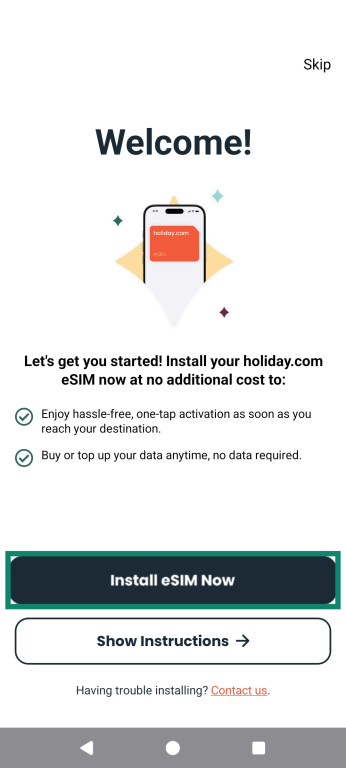
- Tap Install eSIM and follow the on-screen prompts. It may take a few minutes.
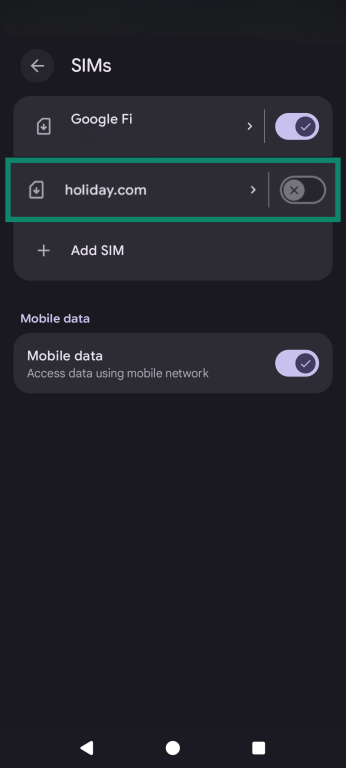
- After installation, an on-screen prompt will take you to your phone's Settings menu when you tap on it. Once there, enable the holiday.com eSIM by toggling it on.

Note: Install the eSIM before traveling, but wait until you arrive at your destination to activate your plan. Follow the activation instructions in the holiday.com app to avoid starting your plan earlier than intended. For full instructions, see ExpressVPN's full eSIM setup guide.
Set the eSIM as your mobile data connection
Once you've arrived at your destination, turn on your holiday.com eSIM and check that your phone is using the eSIM for mobile data. You may have configured some settings during setup, but check them again if you can't connect.
When you activate the eSIM, it should display a pop-up with exact instructions for your device, but in general:
- Open your device's Settings and find the appropriate Cellular or Network & Internet or SIM manager section for your phone. Alternatively, you can search your device’s Settings by typing “SIM” into the search box.
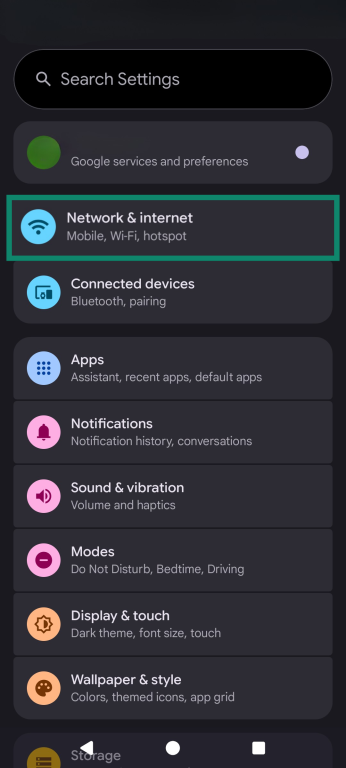
- Select the holiday.com eSIM and make sure it’s switched on.
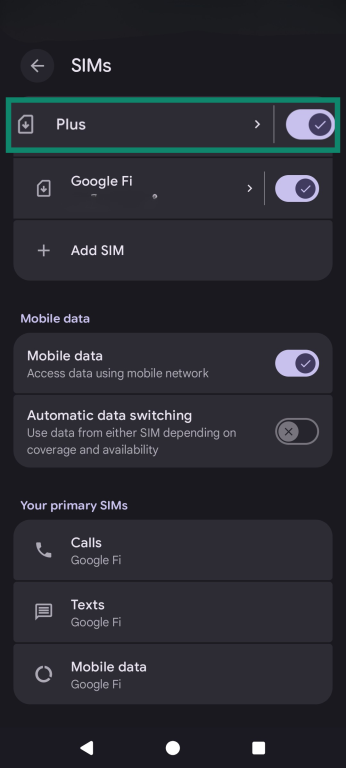
- Turn on Roaming for that eSIM.
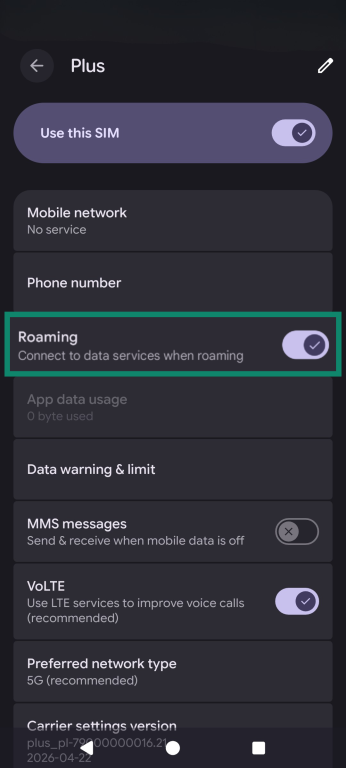
If you still can't connect, check the holiday.com app for device-specific instructions and confirm that your plan is active.
Add data or days to your SIM
If you're running low on data or need more coverage time, you can top up through the holiday.com app or the ExpressVPN+ dashboard. Check the available options and any expiry conditions before purchasing.
For standard data bundles, a top-up is added as a separate bundle under the same eSIM. It remains inactive until your original bundle runs out of data or expires, whichever comes first. For unlimited plans, you can purchase additional days, which begin once your current plan expires.
Use ExpressVPN for extra privacy protection
ExpressVPN encrypts your internet traffic, helping prevent the mobile network operator and others along the connection from directly seeing which websites you visit.
- Open the ExpressVPN app and tap the Power button to connect to an automatically selected optimal server. Alternatively, you can tap the Selected Location bar to pick a specific server.
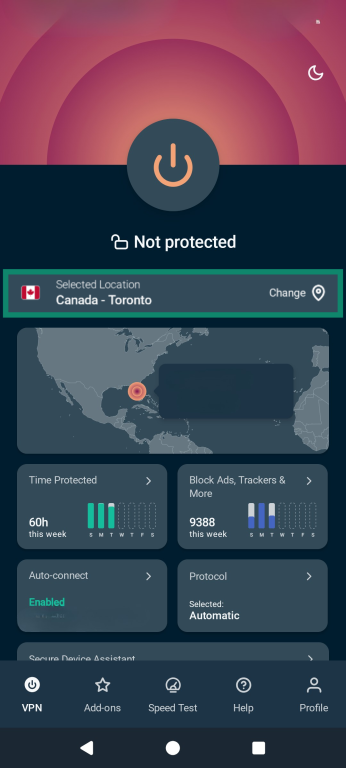
- When the app shows Protected, your traffic is encrypted.
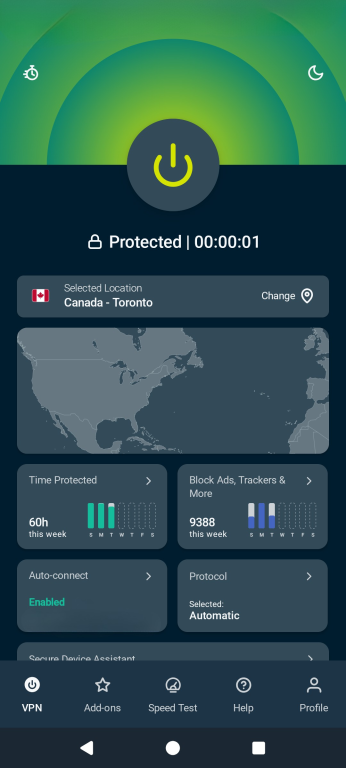
For installation and detailed device-specific setup instructions, see ExpressVPN's full VPN setup guide.
Stay securely connected wherever you travel
A holiday.com eSIM lets you access mobile data in supported destinations without swapping physical SIM cards. You can pair it with ExpressVPN to encrypt your internet traffic and help keep your online activity private while you're away.
Works in 150+ countries
FAQ
Where can I use the ExpressVPN eSIM?
The ExpressVPN holiday.com eSIM works in 150+ countries, including popular tourist destinations such as the U.S., France, Germany, and Japan.
Can I use my ExpressVPN eSIM and regular SIM at the same time?
You may be able to use the ExpressVPN eSIM and a regular eSIM at the same time, provided your phone supports dual SIM and is carrier-unlocked. Your regular SIM can remain active for calls and texts, while the holiday.com eSIM handles mobile data. This lets you keep your usual phone number without swapping or removing your physical SIM.
Can I use the ExpressVPN eSIM on any phone?
The ExpressVPN eSIM only works on eSIM-compatible and carrier-unlocked phones. Since compatibility varies by model and region, check your phone’s specifications and holiday.com’s compatibility guide before buying.