Fastest VPN: Just how fast is ExpressVPN?
Need a fast VPN?
Secure your connection on your devices with a VPN built for speed, using high-capacity servers and fast protocols like Lightway.


Fast, reliable VPN service
ExpressVPN offers a built-in speed test that shows how the VPN server location you're using is performing, with results for download speed, upload speed, latency, jitter, and packet loss. It's available in the ExpressVPN apps for Android, iOS, Windows, Mac, Linux, and Apple TV.
To run a speed test:
- Open the ExpressVPN app.
- Select the Speed Test tab.
- Click the play button and wait for the results.

Experience the VPN that won’t slow you down
Fast speeds
ExpressVPN has VPN servers in 113 countries, and many locations use high-capacity 10Gbps or 40Gbps servers. These servers are built for heavy traffic, which means less congestion and more reliable connections for streaming, downloading, and browsing. For the best speeds, connect to a location close to you.
Unlimited bandwidth
ExpressVPN doesn't cap your downloads or limit your bandwidth based on how much data you use. You can switch VPN server locations whenever you like.
Help with ISP throttling
Some ISPs slow down specific types of traffic, such as video streaming. ExpressVPN encrypts your traffic, so your ISP can't see what you're doing online and can't throttle your connection based on that activity.
Fast VPN protocols
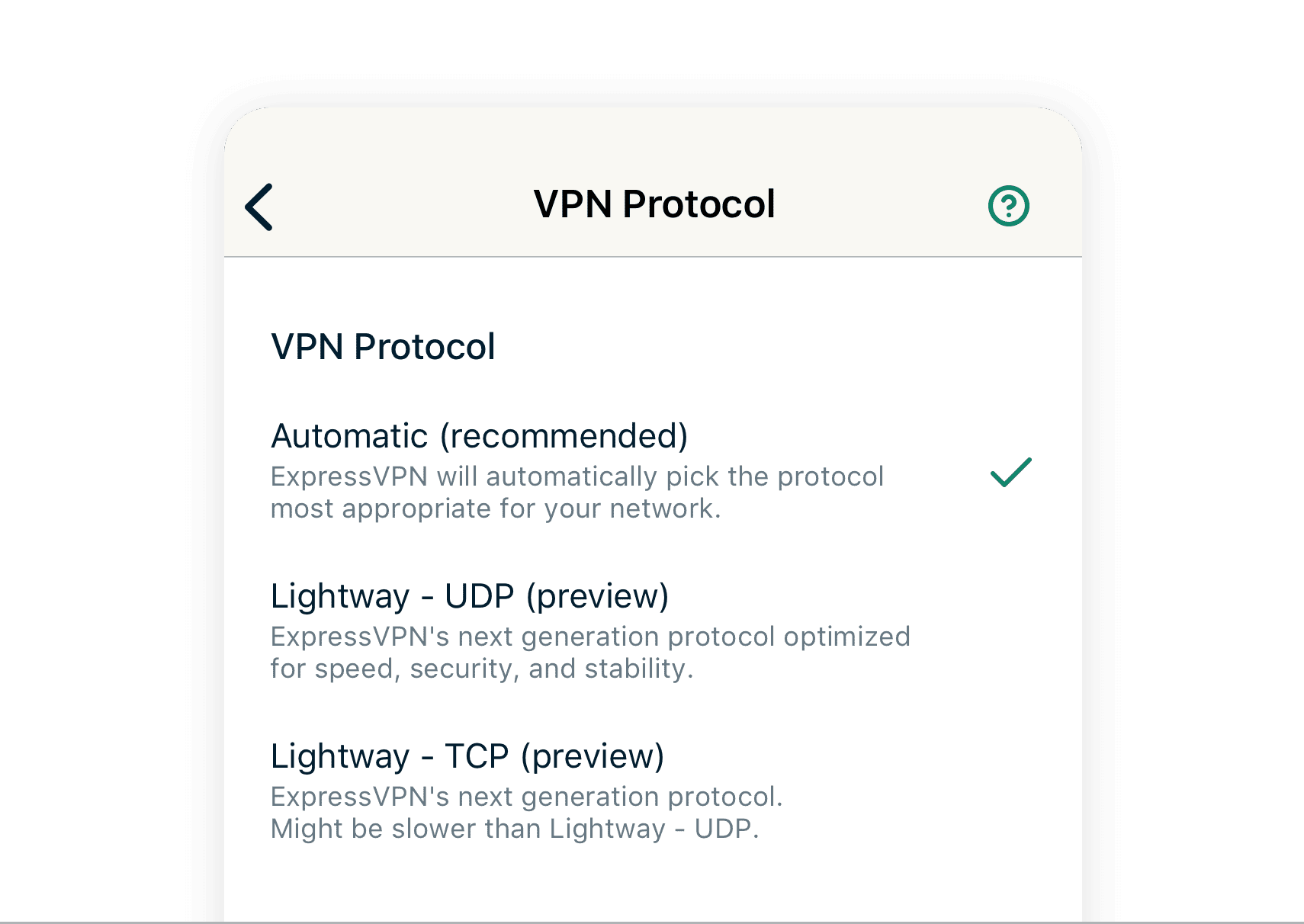
ExpressVPN offers several VPN protocols, each with a different balance of speed and connection reliability:
Lightway - UDP, which we built from the ground up to meet the needs of modern internet users. Offering fast speeds, high reliability, and industry-leading security, Lightway is only available on ExpressVPN.
Lightway - TCP might be slower than UDP but connects better on certain networks. This allows Lightway to be used in a wide range of scenarios.
OpenVPN - UDP offers a strong combination of speed and security but it may not be available on every network.
OpenVPN - TCP may be slightly slower than UDP but is available on almost every network.
WireGuard is a widely used open-source protocol designed for fast connections and low CPU usage. ExpressVPN's version adds post-quantum protection to help keep your traffic from being decrypted by quantum computers in the future.
ExpressVPN automatically chooses the best protocol option based on your network, but you also have the option of choosing between options manually.
4 more reasons to try ExpressVPN
Ultra-fast VPN on any device
ExpressVPN has apps for Windows, Mac, Android, iOS, Linux, Apple TV, Android TV, Fire TV, and more.
Best-in-class encryption
ExpressVPN uses 256-bit AES encryption to protect your data. Our Lightway and WireGuard protocols also include post-quantum protection.
Risk-free trial
First-time subscribers who sign up on the ExpressVPN website get a 30-day money-back guarantee.
24-hour support
Our Support Team is available 24/7 via live chat. You can also contact us by email.

Set up a fast VPN in 3 steps
It’s quick and easy to set up ExpressVPN. You’re done in three steps:
- Sign up for your chosen plan.
- Download the ExpressVPN app for your device.
- Sign in, choose a server, and connect.
Once you're connected, your internet traffic is encrypted and your IP address is hidden from the sites you visit.

Enjoy more consistent streams
Some ISPs slow down video streaming on purpose. ExpressVPN encrypts your traffic, so your ISP can't see what you're watching and can't throttle your connection based on that activity. ExpressVPN also doesn't limit your bandwidth based on how much data you use, though limits from your ISP or data plan still apply.
Protection from the moment you connect
More privacy online
When you're connected to ExpressVPN, the websites and apps you use see the VPN server's IP address instead of yours, which hides your real IP address and approximate location.
Your internet traffic is encrypted, so your ISP and others on your network can't see which websites you visit or what you do on them.
Use public Wi-Fi with peace of mind
Wi-Fi hotspots are convenient when you're traveling or when your mobile data runs out. On public Wi-Fi, though, other people on the same network may be able to monitor unencrypted traffic.
ExpressVPN encrypts your connection, so others on the network can't read what you send and receive. It protects your connection the same way at home, at work, and at school.
Try the fastest VPN risk-free
Take advantage of our risk-free 30-day money-back guarantee for first-time subscribers.
If you’re not satisfied with ExpressVPN, cancel anytime within 30 days and get a full refund.