CVV code explained: What it is, where to find it, and how it prevents fraud


Online shopping is convenient, but it has given fraudsters a new way in. When a thief steals your card number, they can try to use it from anywhere in the world without ever touching your wallet. The card verification value (CVV) code is one of the main barriers standing between them and a successful purchase.
This guide explains what a CVV code is, where to find it, how it’s generated, and what to do if yours ends up in the wrong hands.
What is a CVV code?
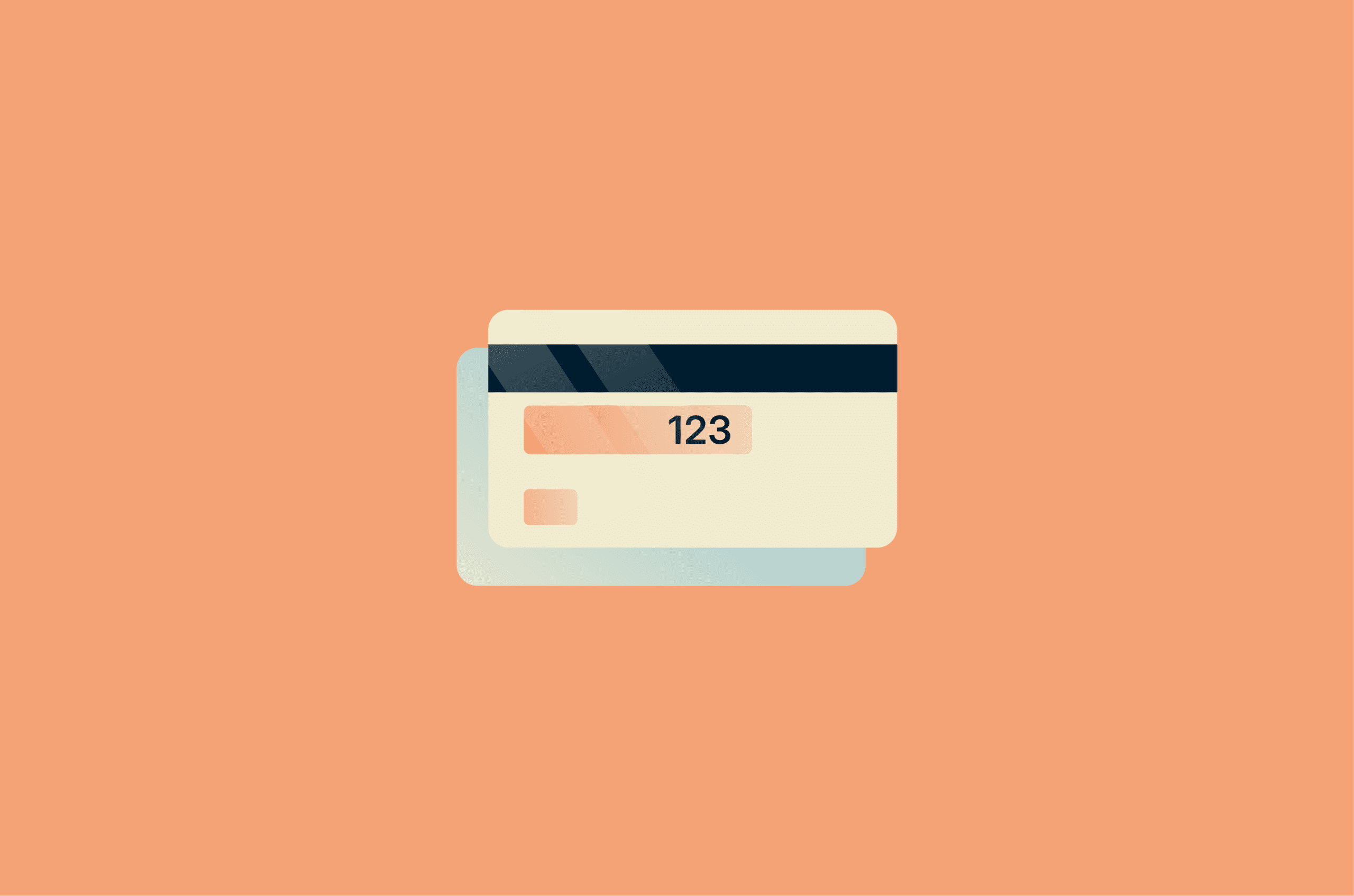
A CVV code is a three- or four-digit security number printed on your credit and debit cards. It exists for one specific purpose: to confirm that the person making an online or phone payment actually has the physical card in their hands.
Quick facts:
- Full name: Card Verification Value
- Other names: CVV2, Card Verification Code (CVC), or Card Identification Number (CID), depending on the card provider.
- Length: Usually three digits; four digits on American Express cards.
- Purpose: To reduce fraud during card-not-present (CNP) transactions.
- Not stored by merchants: Under Payment Card Industry Data Security Standard (PCI DSS) rules, merchants aren’t allowed to store CVV codes after a transaction is processed. So even if a retailer's database is breached, your CVV shouldn’t be in it.
An important design feature is that the printed CVV isn’t stored in the magnetic stripe data. So if criminals only skim the stripe, they still won’t have the code needed for many online purchases.
Where is the CVV code on a credit or debit card?
The CVV code is printed on the card but kept separate from the main card number. It is printed flat, not in raised digits, so it can’t be captured through a manual card imprint.
On Visa, Mastercard, and Discover, the CVV code is a three-digit number on the back of the card, usually to the right of the signature panel or in a small box beside it.
American Express places the CVV on the front of the card. It’s a four-digit number printed above the main card number, typically on the right-hand side. American Express calls it the CID.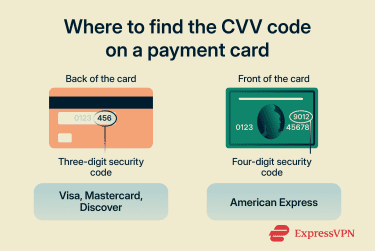
Virtual cards stored in banking apps also have a CVV code, even though there’s no physical card. You can usually find the CVV code in your bank’s app after verifying your identity.
What if you can’t find or read your CVV?
If the number has worn off and you can’t read it, don’t try to guess it. Call your card issuer using the number on the back of the card (or the number on your bank’s website) and request a replacement card.
CVV vs. CVC vs. CID vs. CVV2: What’s the difference?
Different card networks use different names for the same security code. The table below explains each term.
| Term | Used by | Where it appears | Purpose |
| CVV2 | Visa | Printed on the back of the card | Visa’s printed security code for CNP transactions, such as online or phone purchases |
| CVC2 | Mastercard | Printed on the back of the card | Mastercard’s printed security code for CNP transactions |
| CID | American Express | Printed on the front of the card | American Express’s card security code |
| CVV1 / CVC1 | Visa / Mastercard | Encoded in the magnetic stripe, not printed on the card | Used to help verify swiped card-present transactions |
| iCVV | Europay, Mastercard, and Visa (EMV) chip cards | Stored in chip-related card data, not printed on the card | Chip-related verification value used to help detect counterfeit or cloned-card fraud |
The underlying differences are about naming conventions and how each code is stored or transmitted.
It’s also worth knowing why CVV1 and CVV2 are separate. CVV1 lives in the magnetic stripe and is read automatically when you swipe your card in person. CVV2 (referred to as CVV in the rest of this article) is the printed code you type in during online checkout. Keeping them apart means a thief who copies your stripe data still can't shop online with it. They'd have a CVV1, not a CVV2.
CVV codes vs. PINs: What’s the difference
A CVV code and a personal identification number (PIN) are often confused, but they protect completely different situations.
A CVV is used for CNP transactions: online and phone purchases where you can't physically present the card. It confirms you have the card itself.
A PIN is mainly used for ATM withdrawals and some in-person card transactions, depending on the card and region. Unlike the CVV, it isn't printed anywhere; only you know it.
You can't change a CVV, since it's set by the card issuer. However, most banks allow you to change the PIN.
The two work together rather than overlapping. The CVV covers purchases made remotely; the PIN covers transactions made in person.
How is the CVV code generated?
The CVV code is not random. Banks generate both CVV1 and CVV2 using a cryptographic process that ties it specifically to your card. The process generally works like this:
- Four inputs are combined: These are your card number, your card expiry date, a fixed CVV2 service code (000), and a secret encryption key held only by your bank.
- A cryptographic algorithm processes them: The standard method uses Triple DES (3DES), a well-established encryption method.
- The result is formatted for its use: For CVV1, the result is stored in the magnetic stripe and used during in-person transactions. For CVV2, the result is shortened to three or four digits and printed on the card, where it is used for CNP payments.
While both CVV1 and CVV2 are generated using the same process, they differ in two ways:
- Service code: CVV1 uses the real service code from the magnetic stripe (for example, 202), which defines how the card can be used, for example, whether it can be used internationally. CVV2 uses a dummy service code (000).
- Secret key: Banks keep two separate keys for CVV1 and CVV2, so that the values differ, even though the algorithm is the same.
Because the bank’s secret key is part of the calculation, it’s not possible to work out the CVV from just the card number and expiry date, even by someone who knows exactly how the process works. Without the key, there are simply too many possible combinations to guess.
This is why, even when large batches of card numbers are leaked in data breaches, many of those records are still unusable without the matching CVV.
Disclosing your CVV code
Merchants ask for your CVV in situations where they can’t physically check the card, so they need another way to confirm the buyer actually has it and not just a stolen card number.
You’ll usually be asked for your CVV when:
- Shopping online: Most retailers require it at checkout.
- Placing a phone order: Merchants may ask you to read it out to confirm the card.
- Adding a card to a digital wallet for the first time: The CVV confirms you have the card before it is tokenized.
You usually won’t be asked for your CVV when:
- Paying in person: Magnetic-stripe swipes rely on CVV1/CVC1, while chip and contactless payments use EMV chip data and dynamic cryptograms.
- Making recurring subscription payments: You may be asked for the CVV for the first payment, but it isn’t stored, and you usually won’t be asked for it again.
- Using a digital wallet: Services like Apple Pay and Google Pay use tokenization, replacing your real card details (including the CVV) with a unique transaction code each time you pay.
That said, CVV codes don't stop all fraud. Not every online merchant requires one, as some skip the check to reduce checkout friction. Banks use additional methods, such as transaction monitoring, device recognition, and behavioral analysis, to flag unusual activity the CVV check alone would miss.
Is it safe to share your CVV code?
As a general rule, only share your CVV code when you are the one initiating the transaction, on a platform you trust.
It’s generally safe to provide your CVV in these situations:
- Secure online checkout: Completing checkout on a legitimate, well-known e-commerce website. Look for HTTPS in the address bar and a padlock icon.
- Phone orders you initiated: Placing a phone order with a retailer you called. Not one that called you.
- Verified payment forms: Entering your card details through a trusted payment processor, for example, PayPal or Stripe.
You should not share your CVV if:
- Someone contacts you asking for it: Whether by phone, email, or text, and regardless of who they claim to be. Banks, retailers, and card issuers will never ask for your CVV out of the blue. If someone calls saying they need to "verify" your code, hang up.
- You are on a website you didn’t navigate to yourself: For example, one you reached by clicking a link in an unsolicited email.
- The website is not secure: It uses plain HTTP rather than HTTPS.
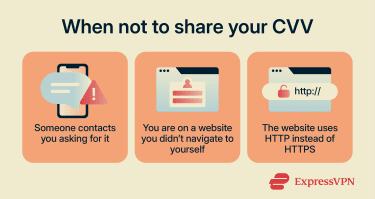 A common method of CVV theft involves fake websites designed to look like real online shopping platforms. You may come across them in search results or as links in emails or text messages.
How CVV codes get stolen
CVV codes are meant to be known only by the cardholder and not stored, so they’re usually not stolen from one central place. Instead, criminals get them directly from the cardholder.
The main methods include:
- Phishing: An email, text, or social media message that appears to come from your bank or a retailer. It directs you to a convincing fake website and prompts you to enter your card details, including the CVV.
- Malware: If your computer or phone is infected, attackers can capture CVV codes during checkout. Common types include keyloggers (record everything you type), infostealers, and browser injection malware (overlays fake payment forms). These grab the CVV before it’s encrypted and sent securely.
- Magecart-style web skimmers (e-skimming attacks): Attackers inject malicious code directly into a retailer's checkout page. When you enter your card details, the skimmer captures them in real time and sends them to an external server. These are difficult to detect because the real site itself has been compromised; nothing looks wrong.
- Physical access: If someone briefly handles your card, for example, in a restaurant, they could copy the card details or take a photo of the front and back. Or, a thief could simply steal your card.
- Enumeration attacks: Instead of stealing card data, attackers use automated bots to systematically guess valid CVV codes by running thousands of small test transactions across payment forms.
What happens if someone gets your CVV code?
Once stolen, CVV data is often bundled with card numbers, expiry dates, and sometimes personal details and sold on dark web marketplaces as “fullz,” complete records ready to use immediately for online fraud.
A thief with your card number, expiration date, and CVV has everything they need to make online or phone purchases on your account.
Common things fraudsters do with stolen card details include:
- Unauthorized online purchases: After running tiny charges across multiple sites to see which numbers are still active (card testing), fraudsters often buy high-value goods they can resell quickly.
- Account linking: Adding the card to digital wallets or online accounts for later fraudulent use.
- Data reselling: Rather than use it themselves, many attackers sell bundled card records to other criminals.
- Cloning: Using stolen magnetic strip data to create a counterfeit physical card for in-person transactions, particularly in areas where chip-and-PIN isn’t widely enforced.
What to do if your CVV code is compromised
If you suspect someone has access to your card details, do this right away:
- Block or freeze your card immediately: Use your banking app if this option is available. If not, call your bank or card issuer right away and ask them to block the card to prevent new charges.
- Review recent transactions: Check your account and card statements for anything you don’t recognize, even small charges. Report suspicious transactions to your bank promptly. Many card issuers offer fraud protection and may reimburse confirmed unauthorized charges.
- Contact your bank or card issuer: Even if you managed to block the card yourself, call your bank to report that you believe your card details have been compromised. Ask them to review the account, watch for fraud, and issue a replacement card if needed.
- Change your banking credentials: Update your online banking password, and change your PIN if your bank advises it or if there’s any chance it was exposed. If you reused the same password elsewhere, change those accounts too.
- Report identity theft if necessary: If the incident goes beyond card fraud or your issuer asks for it, report it through the relevant fraud-reporting channel in your country and file a police report if required.
How to reduce the risk going forward
A few precautionary steps can significantly improve your online safety while shopping:
- Enable transaction alerts: Do this in your banking app so you’re notified of every purchase in real time. This is the most effective way to catch fraud early.
- Use virtual card numbers for online shopping: If your bank offers them, virtual cards generate a temporary number linked to your real account. So, even if the details are stolen, they can't be reused. Note, however, that this may create issues with refunds.
- Be cautious on public Wi-Fi: If you have to make a payment on public Wi-Fi, confirm that the site uses HTTPS and use a trusted virtual private network (VPN).
- Don’t photograph your card or share photos of it online: The front and back of your card together contain everything a fraudster needs.
FAQ: Common questions about CVV codes
Can someone use my card with only the CVV?
Is it safe to store card details on shopping sites?
Does a replacement card come with a new CVV?
What should I do if my CVV keeps being declined?
Take the first step to protect yourself online. Try ExpressVPN risk-free.
Get ExpressVPN